WaveSlide – Gesture-Controlled Presentation System
Control presentation slides using simple hand gestures through your webcam with real-time computer vision and gesture recognition.
Project overview
What this project is about.
WaveSlide is a computer vision-based desktop application that allows users to control presentation slides using hand gestures instead of a keyboard, mouse, or physical presentation clicker. It uses a regular webcam to capture hand movements and recognizes gestures to perform presentation actions automatically.
The application uses OpenCV to process webcam video and MediaPipe to detect important points on the hand, such as fingertips and finger joints. These points help WaveSlide understand different hand positions and movements. Based on the detected gesture, the system can move to the next or previous slide, jump to a specific slide number, pause gesture control, or perform other supported presentation actions.
WaveSlide is built with Python and includes a FastAPI backend for communication, along with a React and TypeScript frontend for its desktop interface. The application uses PyAutoGUI to send keyboard commands to compatible presentation software. It also includes a practice interface, gesture recording tools, settings, and an evaluation dashboard for testing recognition performance.
The project primarily uses rule-based gesture recognition and also supports an optional Random Forest machine learning classifier for experimentation. Its local data storage uses JSON and JSONL files, so a separate database server is not required.
WaveSlide is useful for students, teachers, developers, and professionals who want to explore computer vision, hand tracking, gesture recognition, and desktop application development through a practical project.
Who it is for
Usage and use case
- Install the required tools, including Git, Node.js, and uv, following the project's setup instructions.
- Clone the WaveSlide repository and open the project folder in a terminal.
- Run the setup command to install the required frontend and Python dependencies.
- Run the seed command to prepare demonstration data for exploring the application.
- Start WaveSlide and open its desktop interface.
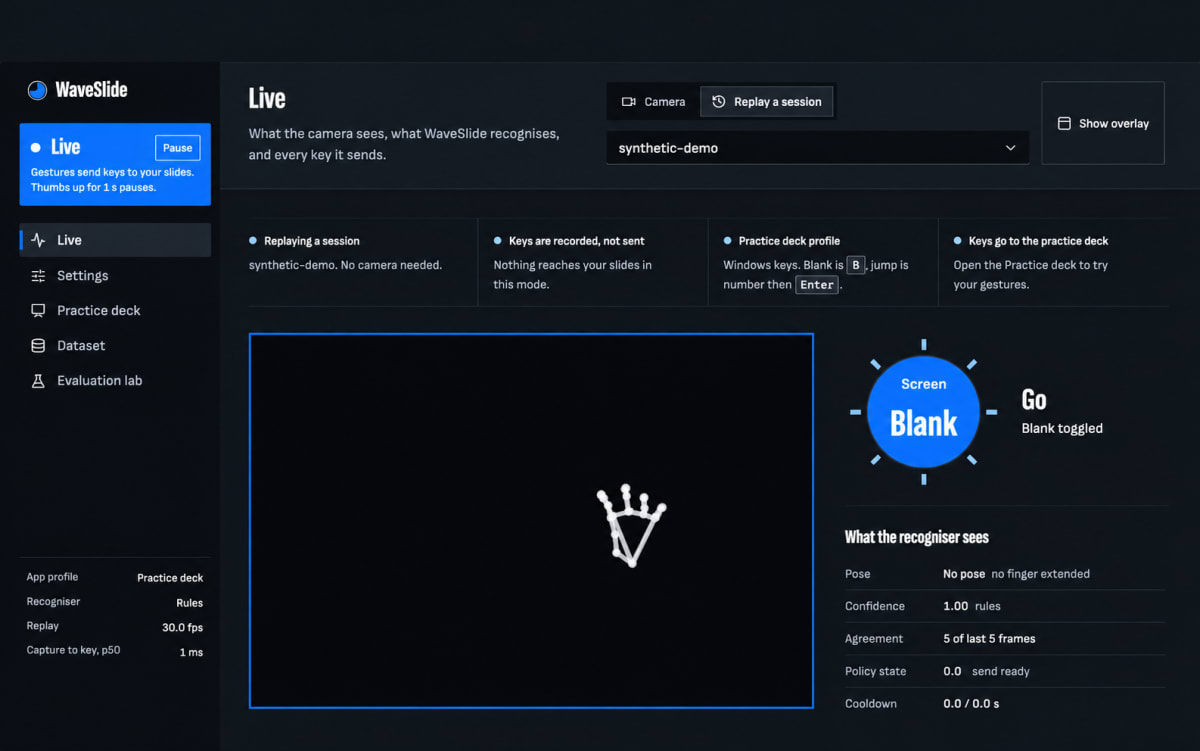
- Select the appropriate camera or use a recorded demonstration session to explore the gesture recognition workflow.
- Try the built-in practice deck to understand how different gestures control presentation actions.
- Configure gesture settings and application profiles according to your requirements.
- Use the dataset and evaluation tools to record gesture sessions and experiment with recognition methods.
Built with
Technology stack
- Python
- OpenCV
- MediaPipe
- NumPy
- scikit-learn
- FastAPI
- Uvicorn
- React
- TypeScript
- Vite
- PyAutoGUI
- pywebview
- Pydantic
- WebSockets
- JSON and JSONL
What you get
Key features
- Real-time hand tracking using a webcam
- Hand landmark detection using MediaPipe
- Gesture recognition using predefined rules
- Optional Random Forest machine learning classifier
- Next-slide and previous-slide navigation using hand gestures
- Slide selection using finger-count gestures
- Gesture-based presentation control and screen blanking
- Activation and pause controls using hand gestures
- Adjustable gesture sensitivity and recognition timing
- Configurable keyboard shortcuts and application profiles
- Live gesture recognition status and camera preview
- Desktop interface with React and TypeScript
- Python backend with FastAPI and WebSocket communication
- Built-in gesture practice deck
- Gesture dataset recording and management
- Model training and evaluation tools
- Offline replay mode for testing without a webcam
- Local settings and session storage using JSON and JSONL
- Automated backend and frontend tests
Before you start
Requirements
Python 3.12
Node.js 24
Git
uv Python package and environment manager
Windows 10/11 or a compatible supported macOS environment
Webcam for live gesture recognition
Compatible presentation software or PDF viewer
Microphone or external hardware is not required for the core functionality
Internet connection for initial setup and dependency installation
Sufficient permissions to access the webcam and control keyboard input
Project media
A closer look.
Optional extras
Boost your project
Optional extras to help you document, present and understand your work. Mention the ones you like when you enquire.
-
Popular Documentation support Submission-ready project report. - Full project report (PDF and Word)
- Setup guide and README
- Diagrams and screenshots
-
Presentation support Slides ready for your review. - Slide deck of 12 to 15 slides
- Speaker notes
- Demo walkthrough script
-
Publication support Guidance to turn it into a paper. - Paper structure and abstract
- Journal and format guidance
- Reference and plagiarism-check help
-
1:1 mentorship Live help from a mentor. - 45-minute video call
- Code walkthrough
- Viva question practice
How do I get a project?
Open the project you like and use the button on its page. If online payment is available you can pay and choose how you want to receive it. Otherwise send us a short enquiry and we will reply on WhatsApp or email.
Can a project be changed to fit my requirements?
Yes. Describe the changes you need when you enquire, and we confirm the scope and the price before any work starts.
Are add-ons available?
Many projects have optional add-ons such as documentation or presentation support. They are listed on the project page with their prices, and you can pick them when you buy or enquire.
How will I receive my order?
You choose email, WhatsApp or a Google Drive link. The delivery time is shown on the project page and in your confirmation email.
Is there a demo?
Projects with a demo video have a play button on their page. If you want to see something specific, ask us and we will tell you what we can show.
Can I get a refund?
Projects are digital, so payments are generally not refundable. If something went wrong, send a refund request with your order reference and we review it fairly. The Refund Policy explains the details.